Friday, 5 February 2016

Unit 35 - Undertake Technical Adjustment of Images

(35.1) Understand key issues relating to technical adjustment of Images

1.1 Explain the principles of colour theory, colour mode and colour management

Colour theory is a guide to colour mixing and usage of combined colours. This is a full colour spectrum, often know as the colour wheel. There are three colour modes. RGB mode stands for: Red, Green, Blue. This is what is used for screens on all digital devices. These colours blended at different levels create other colours. The colours all add up to white on full intensity. This is the colour mode you will see on web images. CMYK is a mode used in the process of printing, standing for: Cyan, Magenta, Yellow and Black (Though really the K stands for Key, meaning the printing plates of the other colours are carefully keyed (aligned) with the key of the black key plate). You’ll notice these colours on all ink cartridges. 


There is also Greyscale colour mode. This is a mode used for black and white images. It only has one channel, meaning that after the conversion from RGB, all that is left are the lightness values. After saving an image as Greyscale, all the data has been thrown away so there is no way of going back to colour. Most people who do this use a copy rather than an original image. 


Colour is a very important thing to consider when I am editing images. Photoshop is my favourite Digital Imagery software. I did a short course on it and find it enjoyable to use. I’ve created all sorts of things from montages to putting the sea in Chesterfield! I’ve had a go at digital colouring. I’ve used it for all sorts of crazy projects! Also with the help of tutorials online, I’m still learning tips and tricks to try out.


I love how anything is possible with Photoshop!


When making a montage of my favourite film, ‘The Legend of Zorro’, I had to consider a lot when it came to colour. As it has a sort of western style theme, I noticed that orange and black seemed to feature a lot, so it was important to me that all the images blended well together and complimented each other, and that the filters and effects I used worked.


As a keen illustrator I’d like to look into digital colouring on Photoshop/ Illustrator in more finer detail. Especially with Manga art.  

1.2 Explain the Importance of Technical Compatibility in Images with Specified Requirements/ 
1.3 Explain the Effect of Image Pixel Dimensions, resolution and bit depth on file size

This is very important as certain file formats may only work with certain browsers and operating systems. It’s important to know what the image is going to be used for and what format the client wants it in. There is a huge difference in resolution and size between RGB and CMYK colour modes. 
RGB/ Screen resolution, for example, images online have a PPI (Pixels Per Inch) of 72, whereas CMYK/ Print Resolution is 300 PPI. DPI (Dots Per Inch) means the measurement of printed images, while PPI is the on-screen measuring method. This is why when we print out images from the internet, they are often blurry and pixelated, yet on-screen they appear perfect. This is because their resolution isn’t high enough. So say if a client wanted an image editing to be uploaded onto their company website, the PPI wouldn’t need to be big. I’ve also noticed this when customising my blog, with certain images not suitable because they are too big. When saving an image in, for example, Photoshop, you can change the quality of the image. Although selecting a higher quality will make the file bigger. Another way of reducing the file size is to compress all the layers into one and save it into something like a JPEG. 

1.4 Explain the importance of having accurate, technical and descriptive Metadata
Metadata is very important when it comes to copyright and the protection of our images online. It’s important to make sure images have all the information they need such as: Who took the photo, where and when it was taken, what time. 

It’s important for images to be protected from these risks, for the sake of the photographer’s work and the business they work for. 

1.5 Identify the merits of appropriate equipment, software, methods and material for different imaging requirements

Having appropriate equipment, software, methods and material is essential in the Creative Media Industry. We have so much choice at our fingertips. Although they are ridiculously expensive, I love Photoshop and Illustrator. They are both pieces of software that are frequently used in this industry, and each work well for different tasks. For example, Adobe Illustrator would work beautifully with a graphics tablet (Something I would really like to own and use for my drawings).


Getting the things we need can be very confusing and costly for a lot of people. For people who are new to digital imagery and have very rarely edited anything before, it may be a good idea to get a cheaper piece of software to begin with rather than splashing out on Photoshop straight away. A good example for Mac users, such as myself, is Affinity Photo which you can buy from the app store for around £30. Or even better, a free piece of software called GIMP which is available for both Mac and Windows. I started with this when I was new to digital imagery. 


1.6 Explain the reasons for using different file formats for digital images, identifying the differences between them 

JPEG: This is one of the most common image formats. It is a compressed file with a small size, so is a good format to use for web images. These files can be edited many times. 

PSD: This is the format we’d be working on in Photoshop. This means we can edit images creatively over a range of layers. This allows us to be creative in the editing process. You can also vectorise and rasterise your images. 

TIFF: This format is often used to store images with strong graphics. Photoshop would store information from these files. 

CAMERA RAW: This is used with Adobe to prepare images for editing.

GIF: I see a lot of these on the internet, particularly Facebook. These are images containing animation. These are good for limited colour images as they can only support 256 colours. 

PNG: These images are still good quality, even after compression. They aren’t very good for large images as they tend to generate large files. Unfortunately, not all web browsers support PNG.

BMP: These don’t compress as well as other formats. The files are often large, so not very good for online usage. However, they do work well with certain programs. 

(35.2) Be able to develop an editing approach to the technical adjustment of images

2.1 Agree with relevant parties the image editing workflow and procedures

I do quite a lot of various jobs on Photoshop both at work and at home. The things I do at home are usually more fun and silliness or more arty and ‘me’ related, whereas at work it’s more promotional material such as posters, banners and fliers. Whether at work or home, I take the editing process very seriously (Unless I’m just being silly like Photoshopping myself with people or swapping people’s faces about for fun!)

At work I have literally just been assigned an editing job to create a promotional flier for the Street Dance session which we run on Tuesdays. The guy who teaches wrote down all the information he wants it to contain and showed me the image he wanted to be used. It’s also important that I make sure to remember the contact details for our organisation. So now I have all the information I need, I am ready to start. 

The main important part is the image. The image is on Facebook and as it is to be printed out on a flier, I may face resolution issues. I’ll have to look at the format it is in and try to find ways around this. Luckily it’s for a flier rather than a poster, so it shouldn’t be too big a problem. Once the image is loaded into Photoshop I will make the important adjustments I usually start with. I give the picture more punch if it needs it, by tweaking the levels. Also does it need any Brightness/ Contrast tweaks. How sharp is the image? White balance? Strong observational skills are needed here to work out what needs fixing. Equally it’s also important not to go too far the other way and over-edit it. 

2.2 Select the most suitable hardware and software for the image editing

I mainly like to work in Photoshop. We have it on most of our Macs at work and I have it on my old Windows Dell laptop at home. However, as the one I have at home is a Windows version, it wouldn’t let me put it on my new Macbook. So if I ever want to do some serious editing at home, I have to use my old computer. 

2.3 Retrieve all relevant material from image sources as required

The image I needed was on the Dance teacher’s Facebook account, so he just asked me to find it on his profile. Once I found the image, I right clicked on it and saved it to the downloads folder on one of the work MacBooks. I then dragged it into my folder. To keep things organised, I created a sub folder called: Street Dance Flier 


This makes things more organised and easy to find. 

2.4 Import retrieved images into the Editing Software

I opened up Adobe Photoshop on the work Macbook. At the top left of the screen I clicked file and new. I set the width to 1000 pixels and the height to 700 pixels. I then had a background to work on. I used the bucket fill tool to turn this black.


I then opened the image from Facebook in another window by going to file and open then selecting the image. 


As it is for a vibrant and youth-appealing session, I began to think about things like font and lighting effects. Straight away from the image I decided I needed a graffiti style font. I downloaded one off the internet called ‘Marsneveneksk’. For awesome lighting effects, I remembered something on GIMP called Fractal Explorer. I opened up GIMP on my personal Macbook and played around with the effects. 


With each one I created and selected, I edited the Brightness and Contrast before saving to make them more punchy and vibrant. I then transferred them onto the work Macbook in my folder and decided on one to use.

In Photoshop, I started with the background and fractal effect opened. I copied and pasted the effect onto the black background and gave it a layer mask. This means that you can use a brush with varied opacity and flow settings to fade areas of images both in and out. I’ve used this option a lot before. It works beautifully when creating montages with the images blending together. 


I cut the image out of the photo leaving a little bit of background. I copied and pasted this onto the effect and again created a later mask to tidy it up round the edges. By double clicking on this layer, I brought up the layer style menu and selected Outer Glow and Drop Shadow. I then tweaked with the settings until I was happy with the glow around the image. I created a text layer for the writing and typed in the information he had given me. I decided on a lively lime green. I decided not to do all of it in the same font as it makes the title stand out a lot more. I added Outer Glow and Drop Shadow so that the writing didn’t look flat, but using a dark Outer Glow instead. Also not forgetting to add our organisation’s online details. I rearranged things and tweaked various opacities until I was happy. After completing the first idea, I wondered if there was too much going on, so I did a more simplified version without the fractal effect and with a bit more of the original image background showing. 


I also created a third version with even more of the original image background on show. This gives the client more to choose from. 


2.5 Check the visual and technical compatibility of the elements to be combined in the editing process

I still have to await the client’s response before I can move further from psd format. Though once a final image is agreed on and the client is content, I’ll save it as a JPEG. This format is reliable and used most. They are great for colour quality and are easy to open on Mac and Photoshop.

2.6 Identify how to treat incompatible elements, following workplace procedures and relevant guidelines

It’s always a good idea to keep hold of the psd file version even when you have saved it to your chosen format. At least then if the format wasn’t compatible with whatever it was being used for, you could always open the psd version and save it as the correct format. 

(35.3) Be able to produce image files to meet the client’s requirements

3.1 Produce appropriate edited images to meet all the clients requirements and workplace standards


3.2 Produce preliminary proofs, discussing and agreeing any further editing with the client/ 
3.3 Liaise with colleagues and/ or client as necessary to resolve any identified problems/
3.4 Carry out any further editing to produce final image files

These are the final images. Before This I showed the client the rough idea. He liked them, but a problem I encountered was that they had printed out very dark so I had to brighten them up a lot so they would print well. My manager was also around and with his wide knowledge of digital imagery, gave me a few suggestions on what to change. He suggested the font for the middle part of the text so that there is more of a balance between the title and our organisation details. He also encouraged me to bring the content in more or widen the canvas size so that in the printing process, no text is too near the edge and at risk of being trimmed off slightly. Also just advice on the general layout of the text. I converted the psd files to JPEGs and brightened them up a lot so they would print better, and they did. All in all, after the changes had been made, I showed the client my final printed images and he was happy with them both. 

(35.4) Be able to save and store image files

4.1 Append image metadata in accordance with workplace systems copyright legislation/ 
4.2 Save the edited image files in the correct format ready for outputting or storage

The final images are saved on the work 13 inch Macbook Pro in my folder which is in the staff folder. The images are also backed up. They are both saved in JPEG format as this is one of the best formats for storage. 

1st Image: 819,517 bytes (823 KB on disk)
Dimensions: 1056 × 740
Name and Extension: Street Dance Final 1.jpg

2nd Image: 581,268 bytes (582 KB on disk)
Dimensions: 990 × 657
Name and Extension: Street Dance Final 2.jpg

(35.5) Understand legislation, ethics and business requirements relevant to technical adjustment of images

5.1 Identify key aspects of legislation relevant to technical adjustment of images

The main aspect of legislation is copyright. If an image is protected by copyright, the permission of the owner will be needed before the image can be downloaded. In this case certain aspects of the image may have to stay the same, for example the size. Especially if you are going to be using the image for commercial purposes on for example, a website or poster, it’s important that the original owner is credited for creating the image in the first place. 


5.2 Identify relevant aspects of Health and Safety Legislation/
5.3 Take appropriate action to minimise potential risks and hazards

Whether employer or employee, Health and Safety is an important aspect. It’s important that the working environment is safe and that any hazards are reported and attended to straight away. Also that exits are not blocked and marked clearly. Everyone needs to be aware of storing items safely and heavy lifting procedures. At our organisation we carry out risk assessments for each session we run, and one for the whole place in general. It is essential for organisations to do this when required. I recently was assigned the job of doing the risk assessment for the two art sessions we run. This gave me a chance to understand how risk assessments work, be more aware of hazards and be able to point out any more potential hazards to note down. 

5.4 Identify aspects of codes of ethics/ conduct relevant to technical adjustment of images

Within the process of editing an image, it’s important not to mislead the target audience or client. It’s important to be aware of any possible copyright restrictions on the images to be used. Luckily the image I used was the client’s own image from Facebook and he gave me the permission to edit it.

5.5 Recognise any potential legal issues arising from the nature of the images to be produced

By using the original image without the owner’s full consent. This could result in prosecution for copyright infringement. Even if you have gained their permission, there still may be elements that the original owner doesn’t want changing about the image. You should also consider the content you edit in. Is it offensive or explicit? 

5.6 Attribute intellectual property and copyright credits in accordance with copyright legislation

Intellectual Property: This refers to things that have been created from the mind and are entitled to be protected by law. Being protected by this law entitles people to have rights over their creative work, including things that have been discovered and/  or invented. Types of these rights include: copyrights, trademarks, patents and industrial design rights. 

Copyright: Copyright applies to all creative works that have been created and recorded. The rights stretch over many creations such as films, written books, art, music etc. It gives the creator/ author rights to their work and the chance to take action against negative unauthorised actions. If infringement/ plagiarism occur, legal action can be taken. This is an automatic right, and by registering with The UK Copyright Service, they will be able to provide evidence making it easier to prove and protect your rights worldwide. 

5.7 Maintain the confidentiality of photographic material as required

This is important, especially in our organisation. Sometimes during the sessions, we take photos for photographic evidence and for social media purposes for our online presence, to advertise our sessions. Young people as young as 11 come to our sessions, so it’s important to make sure they have all completed consent forms and that they don’t mind pictures being taken. We ensure that any paperwork of any kind containing sensitive information is stored away safely. 

5.8 Comply with all business/ organisation systems and procedures

This is important for maintaining an effective way of working and a professional reputation. When working on editing images, we like to get as many views and opinions from our colleagues, and go through several proof readings. Often any promotional material is shown at staff meetings, so we can all decide as a team what we think. It’s important in our organisation that all criticism is constructive and helpful. Also that we are all on the same level and in the same frame of mind.


Friday, 8 January 2016

Unit 01 - Awareness of Employment in the Creative Media Sector

(01.1) Know about employment status in the creative media sector

1.1 Describe the main types of employment status within the Creative Media Sector

As in any job role there are many different types of employment status in this sector. For example, in my place of work, we have quite a good amount of staff but we all have different hours. The main staff members work full-time, but there are also ones who work part-time on certain sessions. I work full-time as an apprentice. Some of those who work part-time even have other jobs alongside. It’s also very flexible as we can choose when to work, just so long as we do our allocated hours and record them correctly.


In the Creative Media Sector, some jobs may not even be permanent. It may be a case that a company may hire someone for their area of expertise on a certain job, but not necessarily want to employ them. This could be really beneficial to that person as it gives them the freedom of not being dedicated to just one company and gives them the exciting chance to work on all sorts of different projects.


Full-Time:
This is when an employee works a full number of hours. This type of employment comes with its benefits such as annual leave which is paid time off work, usually between 20-30 days per year. There is also sick pay for time off work with temporary illness. 

Fixed-Term:
This means you have a contract with the company that you work for and that your employment ends on a certain date.

Part-Time:
This is when someone works fewer hours in a week than someone who works full-time. If someone works under 30 hours a week, they are considered part time. 

Freelance/ Self Employment:  This is something I have always considered personally, but as lovely as it sounds working from home and in your own hours, it wouldn’t be easy to live off. For example an artist may sell a brilliant painting, then as daft as anything half of those earnings are spent on resources to create the next brilliant painting. They need to be sure they are going to be really successful if they are to generate income. 


1.2 Describe the key legal and taxation differences between main types of employment status

People who work both full and part-time are required to pay income tax. The amount depends on how much the employee is earning. 


This is all very different for people who are self-employed. They have to pay their own tax and National Insurance, which is normally something that the employer would do. 

Another type of work is Voluntary work, which I have done a lot of in the past. As you are not getting paid for this, you wouldn’t have to pay tax or National Insurance. This type of work also gives you the opportunity to put valuable experience on your CV. Even though it’s not paid work, it gives employers the chance to see that you are willing to get up and work. 

1.3 Explain the implications of each employment status, in relation to job security, flexibility and working patterns

A lot of creative jobs fall under the Freelance/ Self-employed category. It may be the case that companies hire these self-employed workers but don’t necessarily want to employ them. This is beneficial in some ways for both sides, as the employer doesn’t have to worry about the cost of hiring another worker, and it gives the Freelancer/ self-employed a chance to work on varied exciting projects. They also have the freedom of flexibility, so long as they get their jobs done on time. However, the downfall to this is that jobs aren’t always available and there could be long periods of time where there is just simply no work out there, which puts a massive damper on the income. Also, Freelancers tend to charge at a higher rate, which could potentially put employers off. 

In full and part-time employment, you have set working hours. In this type of employment, you would have much higher job security. You have the reassurance that you are getting paid by the hour. All work places vary on flexibility, depending on the business and their opening times. Some places will be 9-5, whereas at our place we are open in the evenings. Flexibility is needed as we do a lot of events and filming tasks, so sometimes we have to switch our hours about. We are all trusted to manage our own hours, so even if we came in at a slightly different time, we would make sure we finished at the right time.  

(01.2) Understand the Creative Media employment market place

2.1 Describe a range of prospective employers and the profiles and products of these employers

There are many different industries in the Creative Media Sector. When searching for jobs, before I got my apprenticeship, I found it very difficult as it’s not the easiest sector to get into. In my town where I live, the most common ones I seemed to find were in graphic design and marketing. 

An example of one company’s services I used is a little shop in my town called: ‘The Copy and Print Centre’. I’m a really keen illustrator and needed to scan in my work so I had a digital copy. I have an A4 scanner at home, so most images were fine. But when it came to the A3 ones, I struggled. I tried folding them and scanning each side, but it always chopped out a tiny bit down the middle. So I went to this shop and they scanned them properly with an A3 scanner. It was a bit expensive, but the images were good quality and they are backed up safely. As a company they have a lot of services to offer. Leaflets, business cards, copying,  graphic design, branding, framing and lots more. 


I always used to find Indeed.co.uk a helpful website when I was looking for work.  The main problem I encountered was that most of the vacancies were based further afield, but I wouldn't have minded travelling to Sheffield. I went on Indeed.co.uk and typed in 'Illustrator'  Below are three vacancy examples that came up for Sheffield:


The first vacancy was for an Apprentice Graphic Designer for a company called 'Twinkl Ltd'. I had a look on their website to see what services they offered. I found out that they specialise in publishing creatively designed materials for school resources, which is nice as at makes learning more fun and interactive for young people. The name of the company sounded familiar and now I can remember applying for the job there about a year or so ago.

The second vacancy was also for an Apprentice Graphic Designer but in Worksop. The company was called 'Choose Purple Ltd'. I found that this company specialised in web design and a lot of other creative and digital services such as: Graphic Design, print, logos, videos and social media.

The third one was a freelance position for a Digital Designer for a company called 'Leo' in Sheffield. In the job description I found out that this was a big company in digital learning and had worked with lots of big brands. It has offices based all over the UK and even in other countries. They specialise in learning technologies. Their services include: multi-device learning, mobile apps, learning portals, learning games, authorising tools and consultancy.

2.2 Explain how to choose an employer in terms of own personal interests, knowledge, skills and job requirements

Even if you don’t fully know exactly what you want to do, it’s important to know what interests you. Research the company that has gained your interest. Can you get there easily? What exactly is it that they do, and is it something that you can do or are interested in learning to do? Who are the employers and what is their way of working? Creative and lively? Serious and stressful? 

You really need to take a good look at not only your skills, but also your qualities. For example if the job involved tight deadlines and heavy workloads, would you be able to cope well under pressure? If the place is like my place of work where events are put on occasionally, would you be willing to be flexible? 

Also in the Creative Media Sector, it’s vital when searching for employment to have a good, strong portfolio. Some people choose to have a traditional, book-like portfolio, but these days it’s generally best done online. It’s easier, less hassle and also proves that you are comfortable working digitally, which is what most creative jobs involve. It is through your portfolio that you need to express and sell yourself, for this is what will most likely get you your job. 


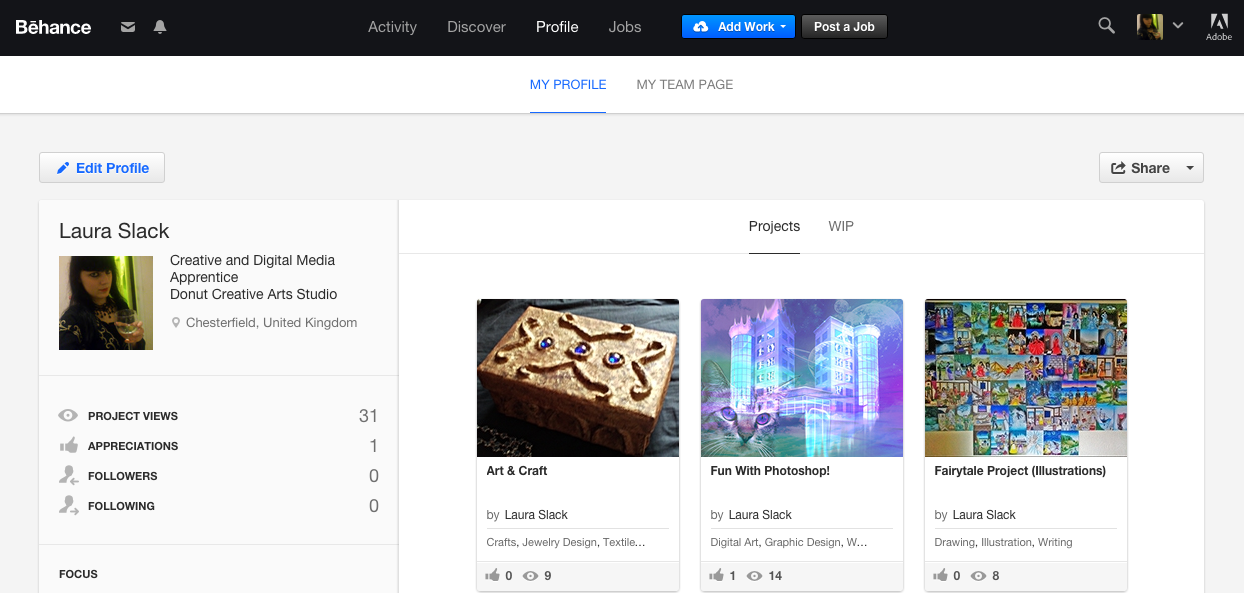
I use Behance.net for my Portfolio. I have lots of different creative interests, so I categorised the projects: Art and Craft, Photoshop, Illustration. It’s important that the images you upload are good quality. Also if you have artwork on paper, scan it in rather than taking photos as it looks more professional and it gives the employer a chance to see the finer details in your work. It’s important to annotate your work. What’s the story behind the piece? What inspired you to do it and what steps did you take to achieve the outcome? I like Behance.net because there is an ‘about me’ and CV section which allows people to really express themselves. Also it is run by Adobe and is easy to use. 

(01.3) Be able to promote self

3.1 Create and present a professional standard CV, with examples of own work, relevant to a specific job application

(See CV and link to Portfolio on separate post)
When putting together my Creative CV, I was encouraged to make it colourful and unique so that it would stand out to the employer. Even to use a completely differently layout to a regular CV. Below is a link on how to structure a Creative CV:

http://www.jobsandcareersmag.com/how-to-write-a-cv-for-the-creative-industries/


I looked at another blog and Googled Creative CVs, and as a keen illustrator this one stood out to me:


It caught my attention with the artwork and the way it is set out, almost like a movie poster. This has opened up a whole new view on CVs to me. It has inspired me to create something more poster-like and exciting after I finish my apprenticeship, rather than simply a dreary page full of words.

It inspired me to create my own. I flitted about between Photoshop and Illustrator, and also scanned in ink work by hand. My first focus was on the textures and colours, then I started to gradually bring in the images and text layers. I decided on a crazy crossover of my old-fashioned tastes meeting my creative and digital side. Straight away the employer can see the sort of things I do and am into. It proves a point that all the things we like don't have to relate to each other. For example, someone may like fast cars and hardcore gaming, yet read romantic history novels. Nobody should ever have to feel the need to lie on their CV. Honesty is the best policy, and in the Creative Industry an online portfolio and presence is essential. 


3.2 Discuss strengths and weaknesses in relation to own work and a specific job application

My creativity is definitely my strongest point as I’ve been artistic for as long as I can remember. My line manager is also creative and is the one who runs the art sessions, so we get along very well and come up with good ideas together. I get along well with the young people who come to the session as I feel I can relate to them and help them out with their work, which feels really rewarding. This has also triggered the improvement of my youth work. I feel that they want the staff here to be fun and on their level, rather than be talked to in a more teacherly tone. After school, they want to come somewhere where they can relax and enjoy creative activities. 

My weakness to begin with was the technological side. As a Windows user at the time, I was a bit worried in my interview when I saw the long line of iMacs! I also found out I’d be doing a lot of filming work. I had done filming before, but not professionally with professional equipment. I was reassured that I would be trained in what to do. I have already learned so much. I’ve done various filming jobs, which I am now confident in doing. I have now officially converted to Mac and have one at home. I have found myself a lot more immersed in technology and using things I’ve never used before. 


3.3 Describe and pitch a creative idea to an employer or commissioner

My line manager is often wanting me to come up with creative ideas for the art session. I often look back on activities I did at college or look on sites such as Pinterest for ideas. Once I have an idea I have to make an example of whatever the idea is, to see what works and what materials to use. Also to see if it is doable or if other things work better. I present the final outcome to her and if we agree on it, we start to plan things like where we are going to run the activity, things we need etc. 

Also every so often we have staff meetings, in which we all pitch an idea for what we can do to make DCAS better. Things often get suggested like new session ideas, for example myself and the other apprentices are warming to the idea of bringing back a gaming session that we used to run. Or even just funding and promotional suggestions. 


Wednesday, 16 December 2015

Unit 05 - Contribute to Good Working Relationships

(05.1) Understand how to agree working arrangements

1.1 Identify key roles and tasks in the production process

My place of work is a creative youth centre type environment where young people come along and participate in various creative sessions. The evening sessions are more leisure based, whereas activities in the day are more for school groups, young people with behavioural needs, and alternative education one to one support. We also hire out our venue to groups who want to use the space and facilities, and bands and musicians come to rehearse, record songs etc. We also sometimes host/ put on our own events.


There are many different job roles in our work place. Our main manager is in charge of making sure everything is running smoothly and making sure we are getting our jobs done. He also does a lot of filming and editing for the people who decide to use our services. My line manager is the creative, artistic one who runs the Art sessions on a Thursday evening, so a lot of my duties revolve around that. I’m also creative and artistic, so we get along and work very well together. As my apprenticeship is Creative and Digital, as well as having a flair for art and Photoshop, I also need to know the technical side so am receiving media training sessions from our manager. We also have someone who runs all the music based sessions. I work alongside two other apprentices. One of them is the Social Media apprentice who deals with all our online posts and publicity. The other one is the Music Production apprentice who works in the music sessions and events such as a thing we do called ‘DCAS Live’ where we get local musicians come in to be interviewed and filmed performing. These performances then go online. Also the roles of the receptionist and caretaker are important, so people can be informed about us and have a point of contact when they arrive and depart, and also that our building is kept in good condition. 


1.2 Outline how to clarify, agree and revise working arrangements in a way which promotes good working relationships

At Donut Creative Arts Studio, a lot of our duties tend to cross over. We believe in helping each other out and encouraging strong team working skills, but it’s also important that we have the independence to be able to work on our own initiatives. Also when we work together we tend to learn a bit more about each others duties and pick up on new skills we didn’t realise we’d discover. Compromising is also important, so for example, if we’re all working an event, it’s important that we ensure everyone is doing an equal amount of the work so it’s fair.


(05.2) Understand how to communicate effectively with colleagues

2.1 Explain the importance of balancing the needs and tasks of people

We all socialise and get along well with each other. As it is a creative environment, everyone is different and has their own things that they are into, which makes conversation more interesting. Especially with working for Derbyshire County Council, we are all big on Equality and Diversity, so we’re not afraid to go really into depth about our hobbies and interests etc. This gives me a feeling of comfort knowing I can be myself without getting judged, whereas years ago when I was at school I was terrified to say anything. It’s amazing how a certain environment can help a person to show who they really are and feel good about it.


2.2 Explain the importance of sharing information with colleagues

Naturally we work on a lot of things together, so it’s important to make conversation with each other in order to maintain effective team work. Also if someone is struggling for ideas, someone is always able to give good advice. Sometimes last minute events pop up which means we have to alter our hours around, so sometimes if someone for example, is out filming a meeting, this might mean someone else having to take over their job such as filming ‘DCAS Live’ or helping out on a session they wouldn’t normally do. In cases like this it’s important to converse with that person who normally does that job, so we know fully what we are doing.


2.3 Identify ways of tactfully requesting others to change working arrangements to improve own productivity

If someone is called to do a job straight away we work out who is doing what, and whoever hasn’t got much to do, or know that their job could be done alongside that job would take over. We all like to make sure everything is fair and work effectively together, making sure everyone’s amounts of work are equal. Prioritizing jobs and tasks on lists always helps me, so maybe this would be an effective method to use as a group when teamwork jobs occur.

2.4 Describe how to explain own decisions clearly and constructively

I would just talk to people about it directly face to face. If the person I was talking to didn’t understand, I would break it down step by step so as not to confuse them. It’s also important to think about what impact my decisions may have on others, before going ahead with an idea. Using verbal and non verbal (body language, facial expression, gestures etc.) communication, I would tell them about my decision in a positive way, but in a way that is almost asking if they approve and if they would like to make any suggestions.


2.5 Describe how to resolve conflict situations or dissatisfaction

This isn’t something that occurs at my place of work, but if it did, it’s important that a big thing isn’t made of it and that it is addressed as calmly as possible. For example, if myself and one of my colleagues got into a big heated argument, customers who came to use our facilities would feel awkward and see us as ‘Unprofessional’. Also it wouldn’t be fair on other colleagues, as they too would feel awkward or maybe feel the need to get involved, which would most likely make the situation worse.


When resolving these things it’s really important to stress on compromising and making sure everyone is happy. Break down the problem into segments. Think what could be changed that everyone will benefit from.

2.6 Explain the importance of liaison with colleagues productivity 

Liaising with colleagues is vitally important in order to get jobs and tasks completed, especially in my place of work where we often have to work together on sessions or events. Also it’s amazing how much you can learn from each other, whether you be working with fellow apprentices, your line manager, your boss etc. As a creative person, I have learned lots of arty tips and tricks from my line manager, and I’ve learned a lot on the more technical side from a few of the others. Where I work we are always happy to share our knowledge and help each other out, which works out great because we are all so diverse and have our own specialist areas.


(05.3) Be able to develop and maintain good working relationships during the production process

3.1 Clarify, agree and revise working arrangements, promoting good working relationships

At DCAS, we discuss what is happening the next day, throughout the week, month etc. and work out who is in and on what shifts. We also consider the skills required for what is happening, so if one of the other apprentices is more suited to the task, they would alter their hours, which sometimes means I have to alter mine. But we always make sure that everyone is happy with the arrangements, and when decisions are final, we take down notes in our diaries.


3.2 Communicate own decisions clearly and constructively


When telling each other our ideas, we always make sure we are not talking over each other. Before making any decisions, I always start by thinking realistically. Is the idea possible? How will it impact on others? How would they feel about it? As described in 2.4, I would use the right body language and do it in a way that is not demanding, and in a way that shows that other people’s suggestions are more than welcome.


3.3 Resolve any conflict situations or dissatisfaction as necessary

It’s important that everyone is comfortable in what they are doing and who they are working with. If not, it shouldn’t be a big thing. It’s just a case of talking to that person as calmly as possible and working together to find a solution to the problem that everyone is happy with.


3.4 Liaise with appropriate colleagues to ensure effective and productive working

We do a lot of youth sessions and public events which requires a lot of our staff to be involved, so we are very often productively working together and liaising.


It’s important that for these jobs everyone has an equal job amount to do, and that if someone has the job that nobody wants to do, we create some sort of rota. For example, a while ago we were the host for a couple of local theatre companies who were putting on shows at our venue. We were involved in various technical duties, but at all times someone had to be on the doors doing front-of-house duties. I started off on that job. After a while it gets really boring and painful being on your feet for long periods of time, but myself and the other apprentices created a rota system and a fair amount of time to be on the doors until we swapped to the next person. 


Friday, 4 December 2015

Unit 04 - Professional Behaviour in the Creative Media Sector

(04.1) Understand the appropriate conduct for a particular creative media workplace

1.1 Describe and compare the cultures of different creative media workplaces

The working environment will always be different, especially in comparison to previous jobs. In my place of work, myself and the other apprentices all have our own separate roles and responsibilities, but we tend to find that a lot of our jobs cross over. This has proven how much flexibility and willingness to learn is needed in the creative media workplace.


Apprentice: Laura

Apprenticeship Placement: Donut Creative Arts Studio

Roles and Responsibilities: Assisting with the art sessions, filming and editing, Photography, reception duties, odd jobs as and when, and generally being a representative of Donut Creative Arts Studio.

Dress Code: We don’t really have a dress code, but like to be seen as presentable. Our place of work is more youth based with a casual, artsy atmosphere. This is a great example of the difference in creative media workplaces. For example, while we have a sort of smart - casual dress code, in a high end design company, they would probably dress smart for their clients. The nearest to a uniform we have is our T-shirts that we wear when we do public events, as promotion is the key to our success.

Time Off: I get 25 days per year, and if I want to book time off it has to be in two weeks’ notice. I have to tell my line manager and the dates get put in the diary and on my Chesterfield College holiday sheet.

Language: As a lot of what we do is youth based, we have to be very careful of our language. As well as the youth sessions, we also hire out our venue to groups so it’s important that we are seen to be polite and professional.

Atmosphere: Our atmosphere is creative, bubbly and artsy. To some we may come across as chilled out and laid back, but we get a lot of creative work done. We like to maintain this atmosphere so that we appeal to the young people and that they get the best out of the sessions we have to offer.


1.2 Describe examples of challenging behaviours and issues in the workplace


Because of the nature of what we do, we sometimes are faced with challenging behaviour, usually not on too big a scale. There is one creative workshop we run for teenagers that have behavioral problems and/ or are at risk of exclusion from their school. We also have an alternative education programme for more one on one support. 

Negative impact on each other and encouragement - Because a lot of the young people come from different schools, they don’t know each other and sometimes they won’t get along very well. After riling each other up, others may end up getting involved while others will get stressed and uncomfortable. It’s just a case of calming them down in the correct way and making sure that the situation doesn’t get any worse. Also if someone decides to be rebellious and do something bad it sets the rest of them off, so it’s a case of looking out for things and trying to prevent them from occurring in the first place. 

Reluctancy - Sometimes in alternative education, young people have a can’t be bothered attitude and are just not attending school. This one can be quite difficult, because you can’t force someone to have a go at something if they don’t want to. Luckily we have the software for a variety of several creative activities whether it be creating a piece of music or designing a building on Sketchup etc. Usually it isn’t too difficult to encourage them. It would be far easier encouraging a young person to do a creative activity that they are interested in rather than school work. This also gives that young person a chance to plan their future and career path. So even if they aren’t cooperating at school, that one creative hobby that they have discovered will allow them to decide their next steps and how to achieve their career goals.

1.3 Explain the role of the key people to inform in relation to these examples

In these situations, we would go to the manager or our line manager to have a talk about the situation. In our working environment we would work together on finding a way to creatively solve the problem. It’s also important that the situation is handled correctly, especially as the department we work in is children's services. 

1.4 Explain the impact of different behaviours and conduct in the workplace

Im my workplace we maintain a friendly and bubbly attitude. Sometimes it can be hard trying to hide emotions and problems from my life outside of work. If for some reason those emotions can’t be hidden we’d go into the office out of the way, as we don’t want negative emotions impacting on the young people that come to our sessions. Because we’re all creative we’re very supportive of each other's problems and feelings and encourage this expression, just so long as it doesn’t impact on others visiting and we’re not seen to be upset. 

(04.2) Know how to plan and manage workload

2.1 Describe effective time management skills needed to plan workload

For me personally, prioritizing is important. I get given a range of duties, a lot of which involve setting up for sessions. Those duties take priority as everything needs to be set up ready for when the young people arrive. I find that taking notes down in a note book and making lists helps me a lot. I work out what needs to be done in the day, and set myself a rough realistic time for each job. Also some days are more active and busier than others, so I use this to decide what jobs would be best suited to which days. My evening shifts are more about setting up for the sessions and working with the young people. The nine to five shifts are more suitable for college work and time sheets which also works well alongside being on reception duty. 

2.2 Describe how to specify and agree timescales, budgets and resources

Timescales: It is important to know how long a task is going to take to complete, and for when it must be completed. Also if the task is to be completed as a team, it is important that everyone is thinking on the same level and agree with each other. It’s important to be aware of the length of time you’ll be working on that day, how much time that one job will take up, and how other daily duties will fit around that shift. 

Budgets: This one is very important in the place I work. Because of all the sessions we run, particularly the art one, we very often need to stock up on equipment. We have a tight budget, so when we need something we try to look around online to see where we can get what we need for the cheapest price. Or if we can’t get it, try and figure out an alternative way of doing the activity. We are currently looking into funding options as we are a creative youth centre atmosphere, so we are eligible for this. 

Resources: When planning for the art sessions, it is my job to check we have everything we need for the activity the day before. This also applies to when we go out filming. We’re very organised and have inventory lists on the cupboard doors where things are stored. It’s also important that we make sure the camera batteries are charged fully beforehand. 

2.3 Explain how to construct a simple project plan

Another part of my job is to come up with ideas for the art session. Usually I will either look back on activities I did at college or research ideas on Pinterest. I would then present the idea to my line manager. If we decide to go ahead with the idea, it’s my job to see if we have the resources we need. If not, the budgeting side comes in and we get the cheapest deal we can to get what we need. Once we have the resources we need, I would then  create an example version of the outcome of the project to get a good idea of how I can help the young people when they come to doing it. 

2.4 Explain the use of a contingency plan

A contingency plan is an emergency backup plan incase an unexpected event occurs, which may negatively impact on the project. As we do a lot of event work for the public, it is important that we have backup plans. The public can be very demanding, and you never know what they may come and ask you for. They may ask for something that requires a lot of work and may take up a lot of time. By consulting the contingency plan, I would be able to figure out how to realistically get the task done, and how it would wrap around my current jobs. 

2.5 Explain the importance of storing work, using version control and observing file naming conventions

The storage of files at my place of work is very important, and it’s very important that they are organised and easy to find. We do various events which involves a lot of filming and photography. We make sure that all separate projects are imported and organised into named folders, and that they are backed up. Especially when we know we’re being paid to do a job, we can’t afford to take any risks in footage and photos going missing. 

(04.3) Understand the importance of continuous professional development 

3.1 Explain what is meant by ‘Continuous professional development’

Continuos professional development, or ‘CPD’, is the improvement and development of specific skills that are needed to carry out your job. For example, it is important that I continue to develop my media skills: Filming, photography and editing. Rather than getting to the point of just being able to do it and stopping at that, I should continue developing above and beyond, which will open up a window of far more opportunities for me. Because  of this, I would be more ready to take on new tasks. Continuous professional development increases efficiency and the opportunities to go further and take on new and exciting tasks. 

3.2 Create and justify a personal development plan

I am currently working on a personal development plan, which I will be able to complete 12 months into my apprenticeship. I feel that my skills in Photoshop are quite strong and are an ongoing development. I'm currently having Media Sessions, so I can develop my skills in filming and photography. Also that I can learn how to import footage and edit it on Final Cut Pro. It's important that I progress well with this over time, as these are vital skills needed for the apprenticeship. 

3.3 Describe opportunities for training and development and explain the relevance of those choices

There are always opportunities for further training at my workplace as we have the software and equipment available. Myself and the other apprentices have had a go at various things. Our employers are always willing to teach us new skills and techniques. I am currently having media training sessions every Monday. If we are interested in learning something new, our employers always encourage us to talk to them about it. Also just simple hints and tips when using certain pieces of software are always helpful and expand our knowledge and skills.